
Update February 2025: Beginning Feb. 25, guests can experience Tiana’s Bayou Adventure at Magic Kingdom and Guardians of the Galaxy: Cosmic Rewind at EPCOT through a standby queue or as a Lightning Lane experience. The Virtual Queue will no longer be used for any rides at the moment. The information below has been updated as well.
Update October 2024: Disney World and Disneyland California announced a new Lightning Lane Premier Pass option – no need to select an experience return time anymore! View here for more details.
On July 24, 2024, the Genie+ service was renamed to Lightning Lane, with a few major changes. These changes should make things less confusing and much easier to use than Genie+. I will update this page as more details emerge, so check back often.
Lightning Lane passes give you access to a shorter line at most of the rides in each park. There may still be a bit of a wait, but it’ll be so much shorter than the Standby line. You are not required to buy these passes for your park day. You can certainly just wait in the free Standby line for each ride instead (except the few that only have Virtual Queues as defined below).
There’s a lot of info out there about this. I’ll try to boil it down for you here. It might seem like a lot right now, but trust me, it is really not that hard and will make sense as you start to use it. Feel free to contact me if you have any questions.
- Overview
- Lightning Lane Definitions
- Virtual Queues
- Buying/Pre-Selecting Rides
- Ride Tiers
- Using Lightning Lanes
- Selection Strategies
- Putting It All Together
- Is it Worthwhile?
- Custom Planning Service
Overview:
If you are familiar with the old FastPass system, this brings back many of the same features while being a paid service like Genie+. However, you can now get these ahead of time to pre-plan your park days instead of waiting until the morning of your park day.
If you’re staying at a Disney resort, you can pre-select 3 rides per day for the length of your stay at 7am ET starting 7 days before your check-in day.
If you’re not staying at a Disney resort, you can pre-select 3 rides per day at 7am ET starting 3 days before your first park day.
The cost for these passes will use dynamic pricing, so that means they will cost more or less depending on how popular/crowded that park is expected to be on that day. Generally, Multi Passes are likely to cost around $20-40 per person per day, while Single Passes may cost about $10-30 each per person per day. Details on these below. The My Disney Experience app will show you the pricing when you select these so you can decide if you want to buy them.
Purchasing the Multi Pass will also grant you free download access to any ride photos from those rides for that day.
Lightning Lane passes are nonrefundable and nontransferable. If you cancel or modify your Resort hotel reservation after you’ve already purchased a Lightning Lane Multi Pass, then your selected attractions and arrival windows are subject to cancellation based on eligibility rules. When you become eligible to make Lightning Lane selections again, then you can use the My Disney Experience app to choose available Lightning Lane Multi Pass experiences and arrival windows for the pass you previously purchased.
Make sure your My Disney Experience app has the latest update if it doesn’t seem like you have the Lightning Lane features.

Below are some more details about this new system.
Definitions:
Lightning Lane (no change) is the name of the service and physical lane/line that you would get into if you buy one of the below passes for that ride instead of getting into the Standby line. You’ll see the signs in front of each ride entrance. Folks will colloquially call both of the passes defined below as just Lightning Lanes, too. Just know that there are two different types of Lightning Lane passes technically, but whichever one you buy, you will get into the labeled Lightning Lane line at each ride when you go to ride it.
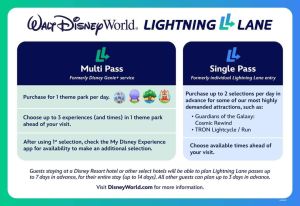
Lightning Lane Multi Pass (formerly named Genie+) is used for most of the rides in each park. You’ll buy the Multi Pass service if you want to ride any of the rides that are not included under the Single Pass option below with a shorter wait. You can select 3 rides/attractions before your trip (more about pre-selections below) and then select a new one as you use one throughout your park day. You can hold three selections at a time and you do not have to use all three of your pre-selected ones before you select another one.
Lightning Lane Single Pass (formerly named Individual Lightning Lane) is used for the one to two most popular rides at each park that are not included in the Multi Pass ride selection bucket. You have to buy these individually for each ride designated as a “single pass” ride if you want to ride them with a shorter wait.
You can only buy up to two Single Passes for each park day, including ones at different parks if you’re park hopping. You can pre-buy these as well (more on buying below). You don’t have to wait until you use one before buying the second one, nor is it dependent on buying the Multi Pass. You should buy one or both Single Passes as early as possible in case they sell out, since they will be for the most popular ride(s) at each park. Just know that they’re non-refundable, and they’re stricter with these return times. You can modify them after purchase to be a different time or ride, but if you pick a new ride that costs less than original one, you won’t get a refund on the difference, and if your new one costs more, you have to pay the additional amount.
The Single Passes are separate from the Multi Pass service. You do not need to buy a Multi Pass to buy a Single Pass or vice versa.
Lightning Lane Premier Pass will give guests one entry to each available Lightning Lane entrance in the theme park they visit that day. This includes attractions included in both Lightning Lane Multi Pass and Single Pass, but guests do not need to select an experience time with Lightning Lane Premier Pass. You do not have to worry about pre-selecting rides for the other two kinds of passes, as described below. You simply buy the Premier Pass and walk up to the rides anytime you want.
The Premier Pass could be useful if the more popular rides are already sold out of their Single or Multi Passes or if you don’t want to worry about booking rides throughout your park day. Of course, this pass is very pricey, so you’ll have to consider how worth it the benefits are to you. It only works for the park that you have purchased it for that day, so if you intend to park hop, you may need to consider a different option for the other parks. This is separate from the other passes; you can buy it in conjunction with the others or just by itself. View my Premier Pass post for more details about this.

UPDATE: After Feb 25, 2025, the Virtual Queue will not be used for any rides, but I’ll leave this information here so you’re familiar with it when it will be used again for future new rides. I’ll update here if it changes again.
NOTE: The way Virtual Queues work will not change with the Lightning Lane change. You will still have to get these on the day of your park day at 7am ET. I’m just still including this info here since you should understand how these can work together with Lightning Lanes during your park day.
A Virtual Queue boarding group is a separate but related entity from the Lightning Lane passes, and it is something to factor in all this. Usually, when a new ride opens and is super popular, they’ll do a Virtual Queue for it so there’s no mile-long line of people standing in the physical Standby line. You can’t even just show up and line up in the Standby line if you don’t have a Virtual Queue group for these rides (currently Tiana’s and Guardians). The Virtual Queue is, in essence, the virtual Standby line.
You need to click into the Virtual Queue section in the app right before 7am ET and try to join a boarding group for these rides. It is free to get.
At every park besides Animal Kingdom, the rides are divided into two tiers for the purposes of pre-selecting your first 3 Multi Pass rides. Tier 1 will be the more popular rides. You can only select up to one ride from Tier 1 and two from Tier 2. If you did not select any ride from Tier 1, then you can select all 3 rides from Tier 2.
If you don’t get it, you have a second chance at 1pm ET, but those return windows will usually be pretty late in the day, so make sure you can stay that late in the park. In order to try to get one at 1pm, you need to have scanned into the park that has the ride you wish to get at some point before 1pm. You can then leave and try for the virtual queue from another location.
On the rare days when that park has Extended Evening Hours for Deluxe Resort guests, you can try at 6pm ET if you are eligible (staying at a Disney Deluxe Resort) to attend the evening extended hours. Note: This is different from the paid After Hours parties.
You can only hold one Virtual Queue boarding group at a time, and only get the same ride once per day. If you manage to get a very early boarding group at 7am and ride it before 1pm, you can try to get a boarding group for a different ride at 1pm or 6pm, per above requirements.
Then, during the day, whenever they get to your group, they will notify you in the app that it’s time to get in the physical Standby line. It will usually give you a 1 hour return window. Note that you may still have some waiting time in that line but at least you haven’t spent all day waiting in that line. It’s hard to predict what time your boarding group will be called since it depends on capacity and possible downtime.
These most popular rides will usually also have a Lightning Lane pass that you can buy. If you don’t want to have the uncertainty of a Virtual Queue return time or the need to wait in the Standby line still when you return, or just weren’t fast enough to get a Virtual Queue, you can buy a Lightning Lane pass instead so that you can pick your specific return time and have a shorter return line. You can also get a Virtual Queue and also buy a Lightning Lane pass in order to ride twice.
If you’re interested in getting a Virtual Queue, follow these steps a little before 7am ET. If you don’t get one, try again at 1pm ET.
- Go into your Disney app at least 5 minutes before and scroll down to the Virtual Queue section on the Home screen.
- Click into it and do the Confirm Party. Pick everyone you’re linked with who wants to ride with you so you all get the same boarding group.
- Then, two minutes before (make sure your clock is accurate; don’t be late), start refreshing the Join Queue screen until the button is not grayed out.
- Reeeally quickly (don’t stop to read), click through the buttons on the next few screens until it shows that you have a boarding group 🌝 or that it has already filled up ☹️.
If successful, when you go back into the Virtual Queue screen, it should show what group you’re in. Yay! Screenshot that for proof in case your app acts up or something goes wrong later. Then, just go about your day and wait until your group is called to line up in the Standby line to ride it.
Virtual Queue passes will usually run out within 2 seconds (not exaggerating), so do this first before doing your Lightning Lane passes, if you also still need to select your first 3 for that day.
Tip: If others in your group have accounts linked together, have them try at the same time to increase your chances that someone gets it for all of you. Just make sure you all pick everyone who wants to ride in their party, too. It’ll only let someone get it once, so don’t worry about conflicts, even if you all try for the same people.
Good luck!
How It Works:
Now that the definitions are out of the way, here’s some info on how to buy and use Lightning Lanes.
Pre-Selecting Rides
Before you can buy the Lightning Lanes, you will need to have your park tickets, and resort reservation if staying at a Disney resort, linked to your My Disney Experience app. If your park tickets are the type where you still need to make park reservations, then you need to make those reservations for each park day you intend to buy a Lightning Lane. You should also have everyone in your party added or linked to your account if you want to purchase everyone’s passes together so that you all get the same ride time.
If you’re staying at a Disney resort (including Swan, Dolphin, and Shades of Green), you can buy either type of Lightning Lane pass, and for the Multi-pass, select the first 3 rides of each day as soon as 7 days before your Resort check-in day at 7am ET. Regardless of whether you have a date or non-date-based ticket or Annual Pass, you can buy for all park days (up to 14 days) during the length of your resort stay at the 7-day mark.
If you’re not staying at a Disney resort, you can buy and select your first 3 rides as soon as 3 days before the park day you want to buy it for, also at 7am ET. If you have a date-based park ticket, meaning you had to select the first day you intend to use your ticket when you bought it, you can buy the passes for every day of your ticket length when your 3-day window opens. For Annual Passholders and those who do not have date-based tickets, such as some military tickets, you will have to buy them 3 days before each individual park day of your trip. Yup, that may mean jumping on at 7am for several days in a row.
If you have park hopper tickets, your 3 pre-selected rides still need to all be for the same park, whether that’s the first park you go to or one you’re hopping to. You will then be able to pick rides at another park for your subsequent selections after you use at least one pre-selected one on your park day. You will be able to modify any remaining pre-selected ones to be rides at another park, too, subject to availability, if you would rather start stacking rides at another park.
You can also choose a specific hour-long ride arrival timeframe when you select your rides. If your park plans change, you can modify your ride selections before their arrival window opens, subject to availability. If you don’t think you can make it to the ride during your selected return window, be sure to modify it to a later time or change it to a different ride for now. Don’t just let it expire because the system will think you’ve used the pass for that ride for the day and won’t let you select it again to ride later.
You will also need to pre-select the same rides for everyone in your party who will be using the Lightning Lane service at first. After you buy them, you can modify them for different rides or times for whoever chooses to do something different. Alternatively, you can purchase them in separate transactions. Select the folks who will be riding the most popular rides first and complete that transaction, then select the other folks to purchase the other rides as the next transaction.
If everyone in your party will be buying the Multi Pass, even if they will be using it for different rides, but not everyone will be buying the Single Passes, you will need to do them as separate transactions also. Buy the Multi Pass first for everyone, then buy the Single Passes just for the folks who need them.
Note: If you’re booking some of the more popular rides, you may want to take whatever time the ride selection defaults to and quickly buy it to ensure that you get any time at all. Don’t waste time modifying them all yet. The system will only hold your selections for 5 minutes, which includes the time you need to enter your payment card and check out. After you buy them, you can modify them to be times that are more suitable for you. Chances are, there will only be available time slots later than the default times you got, not earlier times, though. You can keep refreshing and see if you get lucky with an earlier time. Sometimes, folks will cancel, or they add more availability, but you’ll have to grab them fast.
Note 2: Before you buy your Multi Passes, the system won’t let you modify them with close overlapping times. It will default you to times at least an hour from each other. However, after purchasing, you can modify them to overlap so that they’re closer together if you are sure you can make it to both in time. I’ve also heard of scenarios where the system seems to be defaulting you to initial times that do not overlap with booked dining. So, if you have several restaurants booked that you’re potentially canceling, you may want to narrow them down before booking your Lightning Lanes so that they won’t hinder the times you get for the Lightning Lanes.

Ride Tiers
These are the tier breakdowns as of this writing to give you an idea, but all Lightning Lane experiences and options are subject to change without notice and are subject to availability. Your My Disney Experience app will show the current availability when you go to the Lightning Lane section.
Magic Kingdom
Multi Pass Attractions – Choose up to one experience from this group:
Big Thunder Mountain Railroad
Jungle Cruise
Peter Pan’s Flight
Space Mountain
Tiana’s Bayou Adventure
Choose your other 2 experiences—or all 3—from this group:
The Barnstormer
Buzz Lightyear’s Space Ranger Spin
Dumbo the Flying Elephant
Haunted Mansion
“it’s a small world”
Mad Tea Party
The Magic Carpets of Aladdin
The Many Adventures of Winnie the Pooh
Mickey’s PhilharMagic
Monsters Inc. Laugh Floor
Pirates of the Caribbean
Tomorrowland Speedway
Under the Sea ~ Journey of The Little Mermaid
Single Pass Attractions (Not Available with the Multi Pass)
Seven Dwarfs Mine Train
TRON Lightcycle / Run
Hollywood Studios
Multi Pass Attractions – Choose up to one experience from this group:
Mickey & Minnie’s Runaway Railway
Millennium Falcon: Smugglers Run
Rock ‘n’ Roller Coaster Starring Aerosmith
Slinky Dog Dash
Choose your other 2 experiences—or all 3—from this group:
Alien Swirling Saucers
Beauty and the Beast Live on Stage
Disney Junior Play & Dance!
For the First Time in Forever: A Frozen Sing-Along Celebration
Indiana Jones Epic Stunt Spectacular
Muppet*Vision 3D
Star Tours – The Adventures Continue
The Twilight Zone Tower of Terror™
Toy Story Mania!
Single Pass Attractions (Not Available with the Multi Pass)
Star Wars: Rise of the Resistance
EPCOT
Multi Pass Attractions – Choose up to one experience from this group:
Frozen Ever After
Remy’s Ratatouille Adventure
Soarin’ Around the World
Choose your other 2 experiences—or all 3—from this group:
Disney and Pixar Short Film Festival
Journey into Imagination with Figment
Living with the Land
Mission: SPACE
The Seas with Nemo & Friends
Spaceship Earth
Turtle Talk with Crush
Single Pass Attractions (Not Available with the Multi Pass)
Guardians of the Galaxy: Cosmic Rewind
Animal Kingdom
Multi Pass Attractions – Choose up to three experiences from this group:
DINOSAUR
Expedition Everest – Legend of the Forbidden Mountain
Feathered Friends in Flight!
Festival of the Lion King
Finding Nemo: The Big Blue… and Beyond!
It’s Tough to Be a Bug!
Kali River Rapids
Kilimanjaro Safaris
Naʻvi River Journey
Single Pass Attractions (Not Available with the Multi Pass)
Avatar Flight of Passage
Using Them On Your Park Day
Once you use one of your selected passes on your park day, you can go into the app to select another one. You do not have to wait until you use all three of your pre-selected ones.
You can always have 3 selected at a time, but you can only select a given ride one time throughout the day. That means if you want to ride a selected ride again, you will have to go in the Standby line for that ride.
The tiers no longer matter either, so even if you just used up a pre-selected tier 2 ride, you can select any remaining tier 1 or any other ride next.
The time constraint in the old Genie+ system no longer exists, and you can select any available ride in the app, even one at another park if you have park hopper tickets, as soon as you use a selected one. Therefore, you can go in the app and select your next one as soon as you scan into one of your selected ride, while you’re still walking through the queue. Don’t wait until after you finish the ride.
There may also be additional ones you can select on the day of, such as parades, shows, and character meets, that you can’t pre-select since their availability varies daily.
Ride Strategies
There is no limit to how many rides you can use it on throughout the day, though, so if you’re very lucky and strategic, you may be able to ride every ride that has a Lightning Lane.
There are many, many strategies for doing this, but on a very high level, you generally want to grab the most popular rides first since they can run out fastest.
For the 3 pre-selected rides, I suggest picking a Tier 1 ride for whatever time is still available that you’re sure to be at the park since those are the ones most likely to run out fastest. Then for the Tier 2 rides, pick one ride that has the earliest time that you can get to the park so you can start riding right away and use that slot to pick the next available popular ride, especially any remaining Tier 1 rides you want to do, before it runs out and the other for another favorite ride for anytime available or next earliest time.
On the day of, as you use a selected ride passes, pick the next most popular or favorite must-do ride for whatever time is next available before it runs out, or a ride with the next closest time so you have something to ride again soon, or a ride that’s near your current location that has a close time so you’re not crisscrossing the park too much.
Putting It All Together:
There is so much to explain about Lightning Lanes, but in the shortest of shortcuts, here is how you can use them:
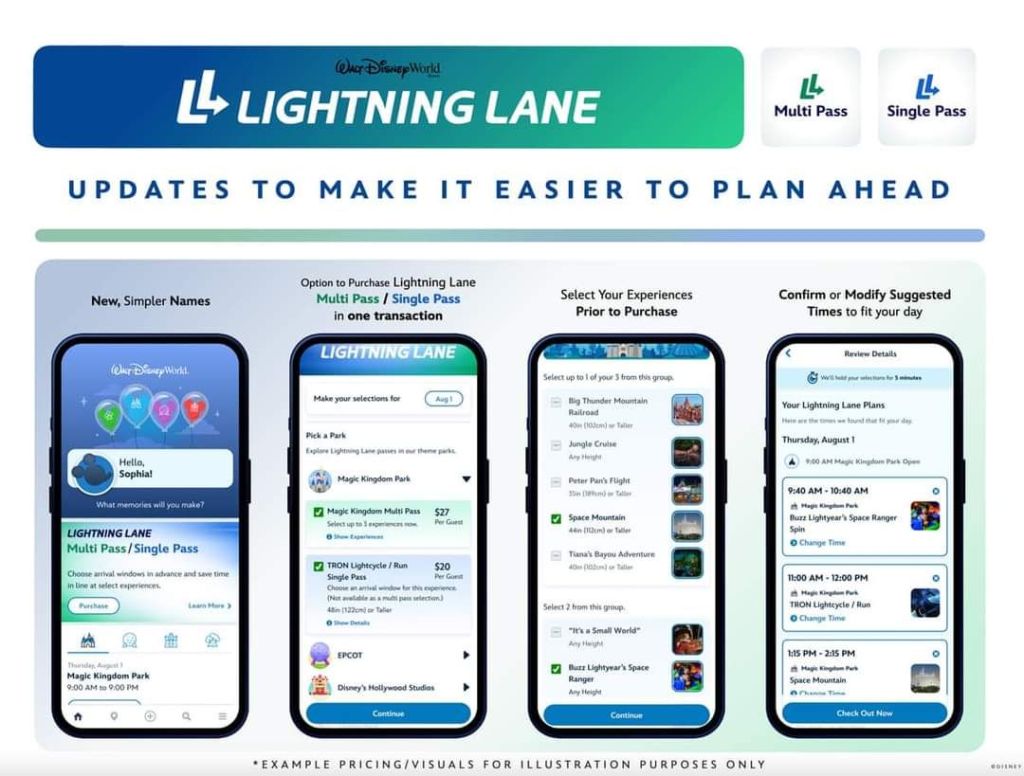
- In the My Disney Experience app, buy the Lightning Lane Multi Pass and/or Single Pass(es) at your 7-day or 3-day mark starting at 7am ET, as explained above.
- Open the My Disney Experience app, then tap the Lightning Lane Passes section on the home screen.
- Select a date and theme park.
- Select a Lightning Lane Single Pass, a Lightning Lane Multi Pass or both.
- If you select a Lightning Lane Multi Pass, you can choose up to 3 Lightning Lane Multi Pass experiences and pick the arrival windows.
- If you select a Lightning Lane Single Pass, you can choose its arrival window.
- Follow all prompts to complete your purchase. You should receive a confirmation if successful.
- From the confirmation screen, you can tap “Plan Another Day” to purchase another pass or tap “View My Day” to view or modify your Lightning Lane selections.
- On your park day, if you’re trying to get a Virtual Queue pass, do that right at 7am or 1pm ET.
- When you’re inside the hour-long arrival time for your selected Lightning Lane ride, go to the line that is labeled Lightning Lane at that ride’s entrance and scan your park ticket card or MagicBand to go in to ride it.
- After scanning a Multi Pass ride, go into the MDE app to select your next one. Repeat this step throughout the day.
- If you have a Virtual Queue selection, when you’re notified in the app that your group is called, go ride that within the hour return window.
Is Lightning Lane Necessary or Worth It?
I think this depends on your tolerance for waiting in long lines and whether you want to ride all the rides. After all, time is money. If you’ve paid all this money for park tickets but only ride, say, 4 rides all day doing Standby, is that enough for you? Whereas, if you buy the Lightning Lanes, you have to add a little more to the overall cost for the day, but you may be able to ride, say, 8 rides instead. Would that make it a better park day? These are hypothetical numbers, of course, but you get the idea. You have to decide how important doing more rides is to your group.
Also, familiarize yourself with the rides included in the Lightning Lanes, how many rides you want to do, how fast they may run out of passes, how long of a park day you have, and how crowded the park is projected to be that day. Purchasing the Multi Pass will also grant you free download access to any ride photos from those rides for that day, so that could save you from having to buy the MemoryMaker photo package, if you were thinking of doing that. Although, you will still need to buy it if you want to download any photos taken by the PhotoPass photographers. This all factors into your ride strategy and whether you may benefit from having the Lightning Lane access for that day.
There are some ways to save a bit, though. You don’t have to buy it for every day of your trip or for everyone in your group. See if it’s enough to just buy the Single Pass or get a free Virtual Queue pass if you just care about those most popular or new rides that have them. If you’ve been to the parks in the past and don’t need to ride every ride, maybe you don’t need to get it and are willing to wait in the Standby line for a few favorites.
However, if this is your first trip to the Disney parks or don’t go very often, you may want to factor this into your overall budget and strategy so that you get a chance to ride the most rides possible. If you get stuck waiting in long lines all day, not doing a lot, you won’t have a good first taste of the parks, and it could be an overall waste of your time and money instead. You can take a more relaxed approach on future trips and not buy it every time or at every park.
I’m purposefully not including exact prices here because they do dynamic pricing for these, so they vary daily. In general, I’ve seen Multi Passes ranging from $20 to almost $40 per person per day and Single Passes ranging from $15-$30 each per person per day. You will be able to see the cost of the passes in the MDE app about 3 weeks before your first booking date. Just go into the Lightning Lane section as if you’re going to purchase them, and you will be able to see the pricing once you select the date and park. It won’t let you purchase anything until your booking date, but you can see the prices of the passes to plan ahead. The more crowded and popular the day, the more they’ll cost. This is another reason to avoid popular times of the year like Spring Break or Christmas weeks. Resorts, tickets, and Lightning Lanes will all cost more those times of the year, so you can save on your overall trip cost by going during off times.
Custom Planning/Strategy Service:
Does this all still seem overwhelming? I can discuss all this in more detail with you and help you form your best strategy depending on the type of rides your party wants to do and your trip style. It’s too much to write about all the possibilities here, plus details of how this works change constantly. Feel free to contact me if you want me to help you plan your next trip.
Planning | Parks | Resorts | Tickets | Lightning Lane | Dining | Transportation | MDE | Other Stuff
 Adventures By Anne