
UPDATE 07/24/2024: The Genie+ service has now been retired at Disney World in Orlando. View my Lightning Lane page to learn all about the new service. The Genie+ functionality at Disneyland California remains the same, just renamed to Lightning Lane.
Disney just announced that the Genie+/Lightning Lane services are starting on Oct 19th at Disney World park. It will start at a future date at Disneyland park.
UPDATED 10/20/2021 – The following information has been updated to reflect how this works now that it’s live…at least as of today. If anything changes, I’ll update again.
If you were used to the old FastPass/MaxPass systems, this is not that much different. Mostly just different names for things.
Lightning Lane is the name of the physical line that you go into to do either type of ride when your return time opens, even though they seem to use it interchangeably for the ride pass names too. That’s what most people get confused about. Think old FastPass lane.
Genie+ are the “regular” rides that you use to be able to get FastPasses/MaxPasses for, it’s just that you pay a fee in order to pick those passes now.
Individual lightning lane/individual a la carte rides are the more popular rides at each park that they used to limit you to two also, it’s just that you have to pay for them individually now. They’re not included even if you buy the above Genie+ service, and you can buy one or both of these without buying Genie+ if these are all you think you need ride passes for. You can do the Standby line for the rest. Somebody start a petition to give these a better name though. I vote for Aladdin+. I think the long, bad name is what’s confusing folks.
I hope this helps clear some things up for you. I know this all sounds confusing and looks like alot of info, but it’s really not once you’re looking at the app and doing it in person. Just read and do your research ahead of time and you should be able to make use of this strategically to ride the most rides you can in a day. If you need help, let me know.
INCLUDED RIDES
The following chart shows the rides that will be included in each park as part of the overall Genie+ purchase vs the individual a la carte ride purchases for the high demand rides when this service first launched. Check the MDE app for the updated list of rides though.
Note: Free Standby lines or Virtual Groups are still available if you don’t want to buy any of these.
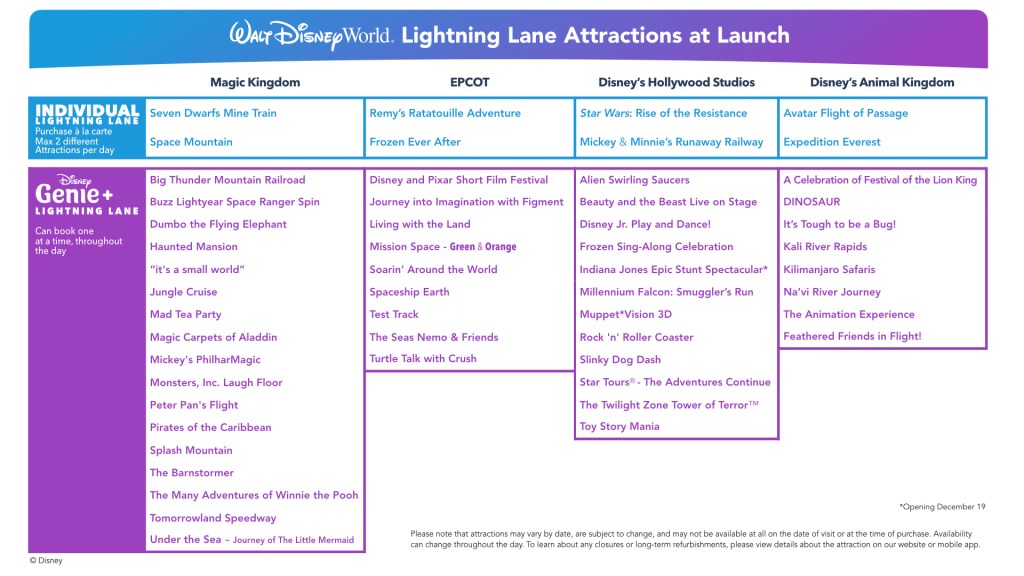
Note: The Genie+ service/rides and the individual a la carte rides are two different things. One does not affect the other. The available rides are different for each. You do not need to buy Genie+ in order to buy an a la carte ride pass. You can hold passes for both types of rides at the same time. They can even overlap, though try to avoid scheduling things that close together. You don’t want to risk missing your return window for one of them.
PRICING
The cost for all of the regular Genie+ rides is a one-time fee per day, not per ride. You can only use it once per ride, but you can ride as many rides as you can fit into your day.
The cost for the individual a la carte rides will vary per ride (more popular = more expensive) and day (more crowded = more expensive). I’ve seen examples ranging from $10 for Everest on a weekday to $20+ for Rise of the Resistance.
You can only choose up to 2 individual rides per person per day. You would pay the cost of each one when you buy it. Paying for the first ride doesn’t mean you get the second ride included. You pay separately for each of these 2 rides. If you have hoppers, you can split your two between 2 different parks, if you want, but make sure your 2nd ride is after the time you can hop. Click the Change Park link to pick the park that you want to get your pass at.
WHEN TO BUY
For the Genie+ service, you can buy it one day at a time, starting at midnight on the day you want it. I recommend that you just buy it the morning of the day you want it, instead of staying up til midnight, since you can’t book your first Genie+ ride until 7am each morning anyway. So, you might as well just buy the Genie+ service right before you’re about to book your first ride for it. You don’t have to be inside a park to do it either. Just stay in bed.
The individual a la carte rides can only be bought each morning too. There’s no pre-buying for these. If you’re staying at a Disney resort, you can book your individual rides at 7am ET. If you’re not staying at a Disney resort, then you can book them at the official park opening time for whichever park you want to book your ride at. You also don’t have to be inside a park at either time to book them.
Note: You don’t have to buy Genie+ or individual a la carte ones for everyone in your party either. If you have someone who won’t be riding most of the rides that’ll need passes, then it may not make sense to buy it for that person.
Also, depending on how crowded the day is and which park you’re at, you can pick n choose which day or park you even need to buy them at. You might have a higher wait tolerance for the standby lines than someone else, or one park has more high wait time rides than another, or one day of your trip could be more crowded than a subsequent less crowded day where you may not need the ride passes as much. So, you do not have to buy it for every day of your trip if you don’t need it.
Note 2: The ability to buy the Genie+ service will not run out, but good/available time slots for the rides that you can book a Genie+ pass for can indeed run out as it gets later in the day, so don’t wait too long to buy it.
* You especially have to watch the times for the individual a la carte passes. These CAN run out. I’ve heard that they were sold out of the ones for Rise of the Resistance within minutes of park opening, so definitely buy these early if you’re sure you want to ride or check often on how far out they’re already booking if you want to wait til later to pull the trigger.
If the parks have opened already, you should check the Tip Board tab in the MDE app first to see what the current wait times and next available pass time slots are to see if it’s worth buying.
PICKING RIDES
You can only select one Genie+ pass at a time, starting at 7am each morning, but you can pick the next one as soon as you use the current one.
When you pick a Genie+ ride, you can only take the next available time slot that’s showing in the app for that ride. You can’t pick one for a different timeframe like you can for the individual a la carte rides, so make sure that the next slot is one that you can do. If you find yourself not able to make a selected Genie+ ride, make sure to reschedule or cancel it before your window opens.
Tip: If you bought the Genie+ option for multiple parks, you can even change your park in the app and pick your next pass for a ride in the next park before you hop over. You don’t have to wait til you get there to book it.
If your selected Genie+ pass is more than two hours away, you can pick the next one approximately 2 hours from when you selected it, or 2 hours after the park opening time if the one you picked at 7am is later than 2 hours after that park opens. The app will tell you when you can pick the next one. Think about this and be strategic! You may be able to hold more than one Genie+ pass at a time this way. However, whenever possible, try to pick a ride with the next closest time slot so you can constantly be riding something and not waiting at least the two hours too often. The exception is, if it’s a very popular ride that could run out of passes quickly, grab whatever time you can get and then try to modify it every so often to see if an earlier time becomes available.
Tip: The return line for most of the Genie+ rides have two scanner checkpoints where you have to scan your Magic Band or ticket to enter during your window. As soon as you scan past the second scanner, you can go into the app and grab your next ride. You don’t have to wait til you’re done riding.
You can book your two individual a la carte rides for the day right away when your window opens (7am or park opening time). You don’t have to wait til you use one before booking the 2nd one for these. But, you have to buy each one separately. It’s not like a shopping cart concept where you put both in your cart and then checkout. You just click on one ride in the list, buy it, then go back to the list and buy the 2nd ride. If one of the ones that you want to buy is at a different park than the currently selected one, click the Change Park link to change it.
Just be careful spreading out the times to ones that you’re sure you can do. Make sure they don’t overlap with dining reservations or nap times!!
Note: Individual a la carte rides cannot be changed, canceled, or refunded, so choose these times carefully!
If you intend to hop, think through if you want to grab one for the next park instead of using up both in your first park. Think how long the standby line might be by the time you get to the next park, and be strategic in picking your two for the day…if you even want/need to use both.
Tip: You are still able to get a free virtual boarding group for some rides that are doing Virtual Boarding Groups, and also buy an Individual Lightning Lane pass for it. So, if you really love the ride, this would be the only way to ride it twice in a day, since virtual boarding group rides don’t have a walk-up standby line. I recommend trying for a boarding group at 7am first, and then deciding if you need/want to buy a pass.
RIDING ISSUES
You are allowed a grace period of 5 minutes before your return window and 15 minutes after your window to scan in if you intend to ride it.
For both types of rides, if you miss your window entirely, the system will treat it as if you’ve ridden it anyway. You won’t be able to select it again to ride later that day since you can only ride any ride one time per day. You would have to use the standby line after that.
Note: If a ride is down during the return window of your selected pass, just hang tight a bit. Don’t go canceling it. They’ll most likely convert Genie+ passes automatically to basically an “anytime/anything” pass that you can use now any other time that day for any other Genie+ ride, and you can let that golden ticket sit in your account til you need it. I suggest saving it for a ride later that you really want that doesn’t have any more passes at a convenient time for you or that’s already sold out. You might even be able to use it to ride something twice this way. Just use this golden ticket strategically too. In the meantime, you can get the next pass for another ride and continue on as usual. Having the golden ticket doesn’t count towards the one-at-a-time concept.
If an individual a la carte ride goes down, they’ll likely assign you a later time for that same ride, or refund you the cost of the pass automatically. Keep an eye on your app to make sure that it reflects that. The process for these individual ones has been changing, so I’ll try to keep up with it.
MORE INFO
If you’re not seeing the new Genie features in your app, make sure to update your app, or log off n log back in, or even reinstall the app. You can’t miss it if it’s there.
Definitely try to become familiar with the new Tip Board and My Day screens and play with those free Genie features to become familiar with them before your trip. You can even set up your preferences for each day (click the Change Day link) ahead of time so that the itinerary suggestions it tries to offer you reflect what you want to potentially do. This part is free to do. You will just get an error message if you try to buy any rides, so don’t bother doing that yet.
Tip: For those of you who are familiar with the old My Plans listing and want to see your trip plans that way again, you can go into the tile menu screen and select the “Future Plans” tile. It won’t reflect the new Genie features, just the traditional park and dining reservations info, but it’s a clean way to get a list of your reservations. It only shows future days though, not the current day, so be sure to screenshot the next day’s reservations by the night before if you want it for the next day.
Biggest Tip: Make sure to bring a big enough battery pack to keep your phone charged all day, especially if you’re the one who primarily does the planning for your group. So much is dependent on your phone now.
To read my short bullet points of Genie+, check out my blog post here.
To read my earlier recap of Genie+, check out my blog post here.
To read the full specifics from Disney, check out Disney’s Genie+ page.
Feel free to contact me if you have any questions or want to add this to your Disney bookings.
 Adventures By Anne