UPDATE 07/24/2024: The Genie+ service has now been retired at Disney World in Orlando. View my Lightning Lane page to learn all about the new service. The Genie+ functionality at Disneyland California remains the same, just renamed to Lightning Lane.
UPDATE 10/8/2021: Disney just announced that the start date of these services will be Oct 19th. Check out my more recent blog post for the list of rides included in each park and pricing info.
Disney just announced the new Genie service that will appear in the Disney World MyDisneyExperience app and the Disneyland app. This will include some new features, plus the new paid replacement for FastPass+/MaxPass that has been rumored for awhile now.
Here’s my summary of everything as I understand it right now. There are tons of articles out there about this, so I’ll try to boil it down a little here.
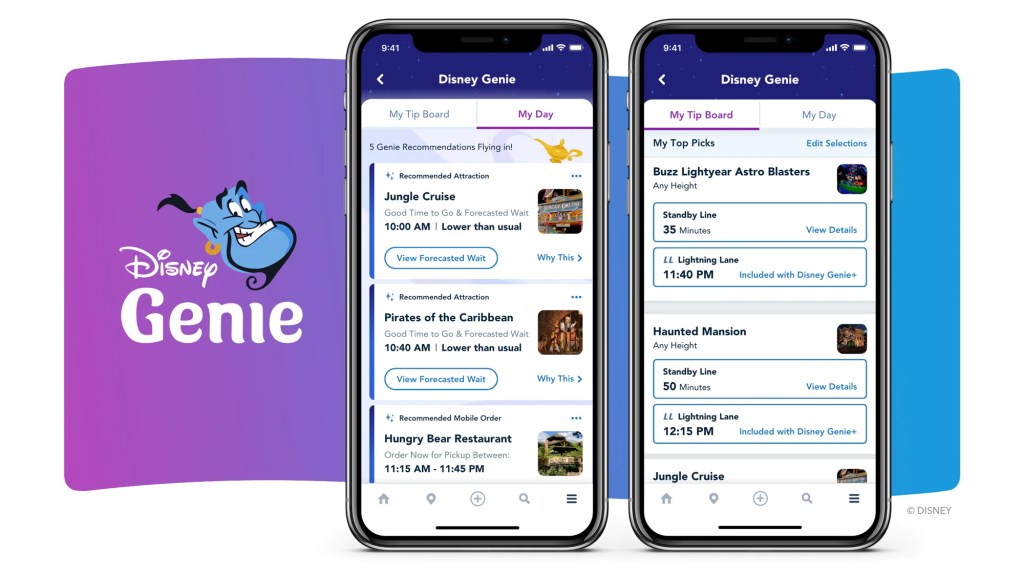
From what I have read/seen so far, it sounds like an “assistant” type feature within the app that’ll give you recommendations on which rides to do next based on ride times and your defined interests. You can specify if you like princesses, Star Wars, and a few other things (they haven’t shown all the things you can specify yet, but it’ll probably be things like thrill rides vs tamer rides, etc) and the Genie will form a suggested itinerary of rides you might like, along with their current wait times. It’ll work together with all the features in the app now, like booking dining and such, so everything will be all in one place. This part of the app enhancement will be free. Everyone can just use this Genie “assistant” by using the Disney apps for each park. It’ll be there by default.
Then, there will be two additional premium features that you can add on.
Genie+: For a given fee per person per day, you can turn it into a Genie+ (note the plus sign) service. This is basically a paid version of FastPass+ and MaxPass that used to exist in both parks and works very similarly. This enables you to pick the ride time window for your next ride and not have to go to the ride until that time, rather than standing in a long line in that queue.
When it’s time to go to that ride, you will go through the “Lightning Lane” instead of the usual Standby line, so you’re not waiting in a line. They’ve basically just renamed the old FassPass/MaxPass lines to now be called “Lightning Lanes”, so don’t let this info confuse you. Just equate Lightning Lanes to FastPass/MaxPass entrances and Genie+ to the old FastPass+/MaxPass system.
Like before, you can only hold one time selection at a time, so you have to wait until you ride that one before you can pick your next one. The exception is that if the return time is more than 2 hours away from your selection time (or 2 hours after park opening time), you can pick the next ride after 2 hours so it’s not like you’re stuck with a huge block of time where you can’t pick anything. There’s no limit, so you can select rides all day as long as times are available, but you can only pick each ride one time throughout your day.
If you intend to park hop that day and want to use the Genie+ service at the other park too, make sure you buy the one that let’s you use it at multiple parks instead of the specific park one.
When you buy the Genie+ service, it also includes some additional features, like photo downloads at Disneyland and VR Snapchat filters at Disney World. Unfortunately, it does not include the actual photo downloads at Disney World, so you will still have to buy the Memory Maker package separately if you want the photo downloads.
You can buy this Genie+ add-on starting at midnight of the day you intend to use it, and then pick your first ride starting at 7am of that day.
Individual Lightning Lane Selections: The second add-on feature is the ability to select ride times for up to 2 rides per day that belong in this category. These are the really, reeeally popular rides, like Mine Train and Radiator Racers, that aren’t included in the above Genie+ category. The cost of these will vary by availability. Their prices are listed in the MDE app where you go to buy them.
You do not have to buy the Genie+ service in order to buy these Individual Lightning Lanes, so you can pick and choose if you just buy one or the other or both, depending on which rides you think you need them for.
As a benefit to guests staying at a Disney resort, if you’re buying the Individual Lightning Lanes, you can make that first selection at 7am each morning, without needing to be in the park. The 7am head start is especially helpful since these will be the really popular rides that may run out of times quickly. If you are not staying at a Disney resort, you can make your first selection at park opening time for the park whose ride you’re buying it for.
They will continue using the current Virtual Queue system for some reeeally, reeeeeally popular rides that come along. Check the MDE app to see which ones currently have Virtual Queues. If they have a Virtual Queue, most likely, that means you cannot just walk up to it and wait in a Standby line. Virtual queues are still free. It sounds like these rides will be included in the Individual Lightning Lane category as well. So, if you aren’t able to get a virtual group or choose not to go through the stress of even trying, you would be able to just pay for an Individual Lightning Lane pass for it.
So, essentially, the rides will be divided into 4 categories – ones that are usually pretty low waits that they don’t even include any passes for, ones with moderate waits that you can buy Genie+ to get passes for, ones with high waits that you have to buy specific Individual Lightning Lane passes for, and ones with super high waits that you have to join a Virtual Queue to ride.
Of course, you can just use the free Standby queue to ride any of the rides still, besides the ones with only Virtual Queues. It just depends on your wait tolerance level and which rides you want to ride. You have the flexibility to decide how you want to make use of this depending on ride times for that day. It comes down to a time vs cost decision – so whether it’s worth it will differ for each person.
All of these features are supposed to roll out this Fall, though they didn’t give a specific date, so I guess we’ll see if they reveal more details before then. There are still some unanswered questions too. Who knows? Even some of what they’ve revealed so far may change between now and then. Once it rolls out, we’ll see for sure how it works and what other features are included. I’ll keep you posted if there are any major changes. It’s not that far away.
In the meantime, if you want to read the full article and watch a video from Disney revealing this new enhancement, go to the sites here:
 Adventures By Anne